asset — a reusable opening or component type
asset <name> door|window|component [key:value...]An asset is a reusable definition. Door and window assets supply defaults to an
opening. A component asset supplies a physical plan footprint and a reference to plan
artwork for furniture, sanitary fixtures and equipment.
asset SD1 door   w:800  h:2000 style:sliding name:片引き戸
asset W1  window w:2600 h:2200 sill:0        name:掃き出し窓
The first positional argument is the name. The second selects the reference contract.
| Kind | Referenced by | What the definition supplies |
|---|---|---|
door | an indented door | opening defaults |
window | an indented window | opening defaults |
component | asset: on a named area | fixed plan dimensions and plan SVG artwork |
The reference is the first token of the opening
The first token on the opening line that is not a key:value is read as an asset name.
boundary /home/ldk /home/hall1 t:120 spec:LGS
  door SD1 edge:E hinge:S swing:b
The asset's attributes become the defaults, and the instance's attributes override them.
muro 1.6
unit mm
grid X 0 3600 7200
grid Y 0 4500
level L1 0 h:2400 slab:150
asset D1 door w:900 h:2100 style:hinged name:玄関ドア
space /L1/a room X1..X2 Y1..Y2 name:室
space /out name:外部 outside:1
boundary /L1/a /out t:150
  door D1 w:1200 edge:S name:大扉
The composed opening comes out like this. h and style flowed in from the asset; w and name were replaced by the instance.
{
  "kind": "door",
  "ref": "D1",
  "w": 1200,
  "h": 2100,
  "at": 0.5,
  "edge": "S",
  "attrs": {
    "name": "大扉",
    "style": "hinged"
  }
}
The reference itself (ref) survives into the canonical JSON, and so does the asset definition, under assets. Assets do not disappear in composition — their values are baked into the opening and their provenance is kept.
The writable attributes are the opening's
An asset uses the opening ledger unchanged. There is no attribute writable on an asset but not on an opening, nor the other way round.
| Attribute | Tier |
|---|---|
w h at edge hinge swing | structure |
style panels name | interpreted |
sill spec fire | carried |
A key outside the ledger needs a namespace containing a dot.
✖ asset D1 carries finish:, which is not in the ledger (check the spelling, or add a namespace if the value is only carried — e.g. acme.finish:塗装)Reference errors
A mismatched kind stops. A window asset cannot be used as a door.
✖ The asset W1 is a window (it cannot be used as a door)An undefined reference stops. A misspelling never slips through as "a leading token that happens not to be an asset name".
✖ Undefined opening asset: SD9A duplicate name stops — within one file and across layers stacked by import alike. The message reads Duplicate asset name: D1, followed by the provenance (file and line) of the one already seen.
An asset's opening presentation is checked at the declaration too. A door asset cannot carry a
window-only style (OPN09), and panels: must describe a whole-count curtain-wall window (OPN10).
An unchanged instance does not repeat the asset's diagnostic.
Component assets
asset WC component w:700 d:1200 plan-svg:./svg/wc.svg category:sanitary name:Water-closet

space /L1/wc wc X1..X2 Y1..Y2
  area X1+300..X2-300 Y1+300..Y2-300 name:wc-fixture asset:WC align-y:max
w: is the physical extent along the component's unrotated model X axis. d: is its extent
along model Y. Both are millimetres and required. plan-svg: is a relative path, resolved from
the layer that supplied its effective value. name: is the type's display name. category: and
spec: are carried and never select artwork, dimensions or behaviour.
The SVG bytes do not enter Model, canonical JSON or Form. The reference
and the physical dimensions do. koyu plan reads the resource only while drawing. The TypeScript
drawing API takes the bytes in PlanOptions.componentSvgs; Node callers can obtain that map with
componentSvgFiles(model) from @kensnzk/koyu/node.
The drawing refuses a resource instead of approximating it when the file has no positive
viewBox, its aspect ratio disagrees with w:d, or it contains active or external content. The
accepted SVG is embedded as an isolated image, so its internal defs, masks, clip paths and IDs
cannot collide with those of the plan sheet.
Component assets are not stretched to their host area and are not auto-rotated. Placement is the contract of the named area; see area.
The standard plan library
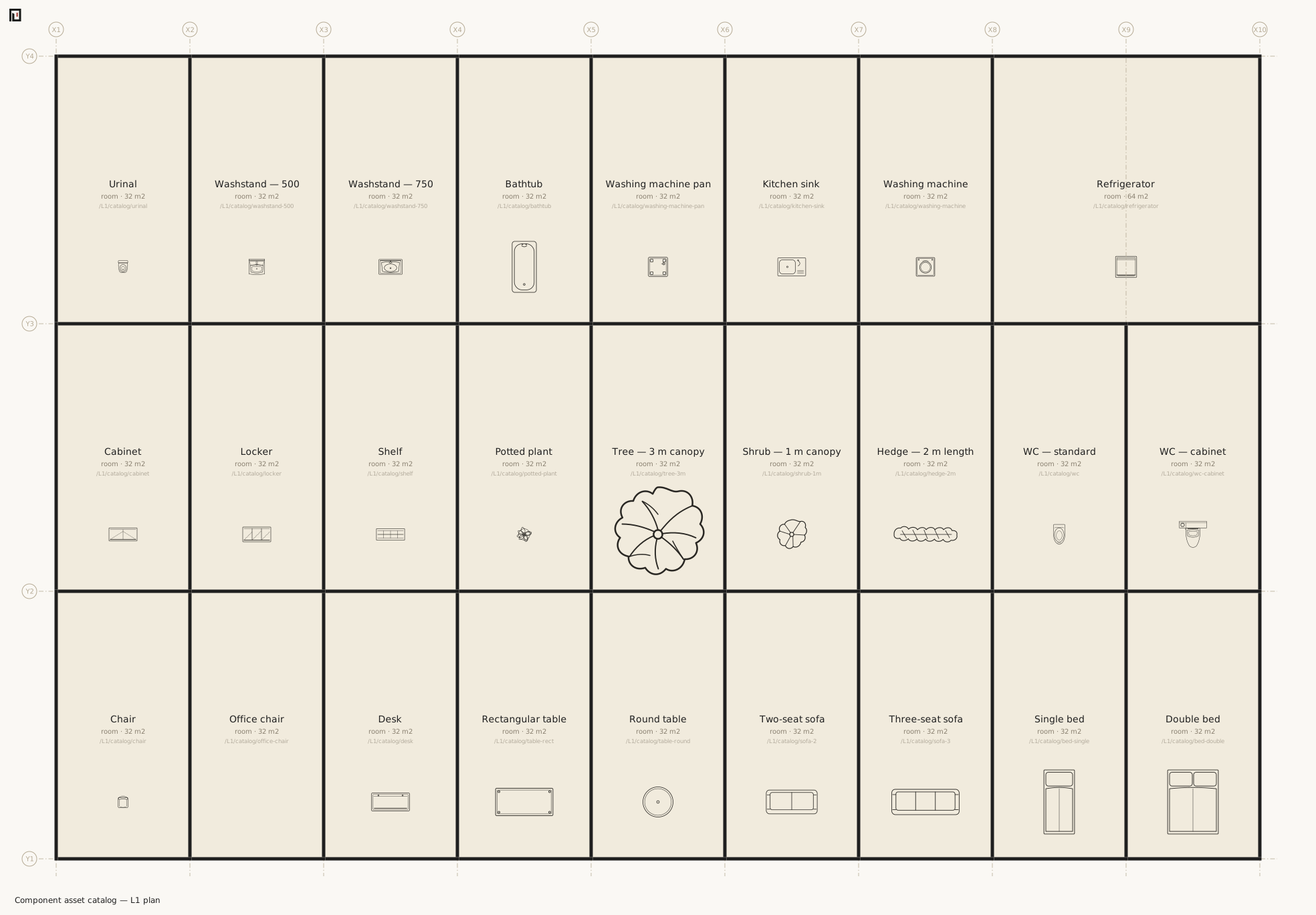
The package ships assets/plan/library.muro with original furniture, sanitary-fixture and
appliance SVGs. assets/plan/catalog.muro places every entry once and is the review sheet; the
library file itself is the asset ledger, so no second list of identifiers is maintained here.
import ./assets/plan/library.muroUse a relative path appropriate to the building's entry file. The same files are available from
the package data subpath @kensnzk/koyu/assets/*.
An asset's name is the name of a type
The name in asset W1 window … name:掃き出し窓 is the name of a type of leaf, not of an individual. So hanging the same asset twice on one wall does not collide.
muro 1.6
unit mm
grid X 0 7200
grid Y 0 4500
level L1 0 h:2400 slab:150
asset D1 door w:900 h:2100 name:片開き戸
space /L1/a room X1..X2 Y1..Y2 name:室
space /out name:外部 outside:1
boundary /L1/a /out t:150 edge:S
  door D1 at:0.25
  door D1 at:0.75
boundary /L1/a /out edge:E
boundary /L1/a /out edge:N
boundary /L1/a /out edge:W
check comes back green. An opening's identity comes from a name unique inside its boundary, but only a name written on the opening's own line counts as a claim — the same value inherited from a referenced asset is not one. Write name:D9 on both and it collides then, and only then.
✖ Duplicate opening name within boundary /L1/a | /out: D9 — the name is what identifies it inside its containerKeep them in their own file
The standard practice is to keep the asset set in its own layer and stack it with import.
import ./assets.muroA layer is composed once, so a double import and a cycle are both idempotent.
Neighbouring pages
- door / window — boundary-hosted asset references
- area — space-hosted component placement
- boundary — the relation openings sit on
- koyu check